
If you own a website, one question matters more than most.
How to track website visitors in real time.
Knowing who visits your site, where they come from, and what they do helps you improve content, fix weak pages, and get more leads. Without tracking, you are guessing.
In this guide, I will show simple and practical ways to track website visitors, especially for WordPress users.
Why Tracking Website Visitors Matters
Tracking is not just about numbers.
It helps you understand: • Which pages people visit most
• Where your traffic comes from
• How long visitors stay
• Which pages bring leads
• Where users drop off
When you know this, you can improve pages that matter and stop wasting time on things that do not work.
How to Track Website Visitors Using WordPress Plugins
If your website is built on WordPress, plugins are the easiest place to start.
Visitor Traffic Real Time Statistics Plugin
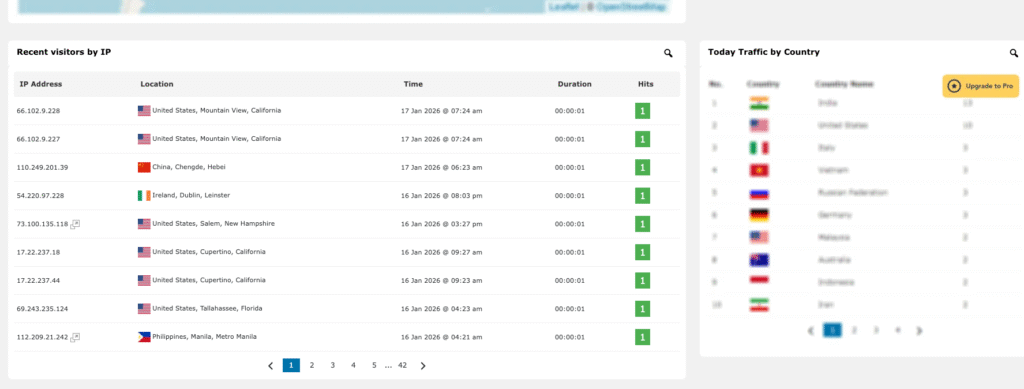
This is a free plugin that shows real time activity on your website.
What it tracks: • Live visitors on your site
• Visitor locations
• Pages being viewed
• Referrers like Google or social media
It is simple to set up and good for quick insights, especially if you want to see activity as it happens.
This is one of the tools I personally use on my business website.
How to Track Website Visitors with Google Site Kit
Google Site Kit connects your WordPress site with Google tools in one dashboard.
It includes: • Google Analytics
• Google Search Console
• Page speed insights
With Site Kit, you can see: • How many users visit your site
• Which pages get traffic
• Search terms people use to find you
• Device data like mobile or desktop
This is one of the best free ways to track website visitors and understand long term performance.
How to Track Website Visitors with Google Analytics
Google Analytics gives deeper data than most plugins.
It helps you track: • User behavior
• Traffic sources
• Popular pages
• Conversion goals
You can also see real time visitors inside Google Analytics, including which pages they are viewing right now.
For most business websites, this should be your main tracking tool.
How to Track Website Visitors Using Heatmaps
Heatmaps show how users interact with your pages.
They help you see: • Where people click
• How far they scroll
• Which sections get ignored
Popular heatmap tools include Hotjar and Microsoft Clarity.
These tools are useful when your site gets traffic but not enough leads. They show what users actually do, not what you assume.
Which Method Is Best?
There is no single best tool. It depends on your goal.
For real time tracking
Use a WordPress plugin plus Google Analytics.
For SEO and traffic growth
Use Google Site Kit with Search Console.
For conversion improvement
Add heatmaps to understand behavior.
Many businesses use a combination of all three.
Final Thoughts
Learning how to track website visitors is not optional anymore.
If you want more leads, better pages, and smarter decisions, you must know what is happening on your site.
Start simple. Track traffic. Watch behavior. Improve what matters.
If you are not tracking your website visitors yet, now is the right time to fix that.
Need any help?
Contact us at rajasain.com